Sync, Backup, Repeat: How One Smartphone Can Drag Down the Wi-Fi for Everyone Else

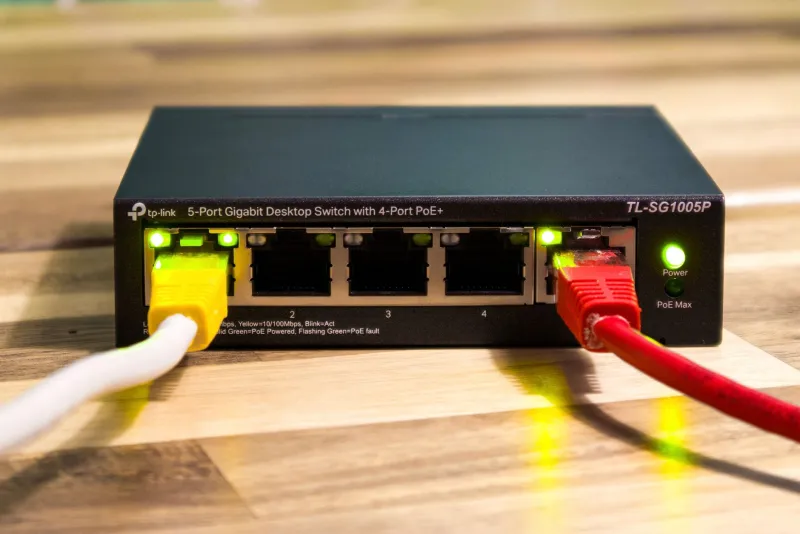
Photo: El Nuevo Doge, CC0, via Wikimedia Commons
When a household's Wi-Fi turns sluggish, the instinct is to blame the router, the ISP, or the teenager streaming video upstairs. Rarely does anyone suspect the phone sitting face-down on the kitchen counter. Yet in many American homes, a single smartphone generates more background network chatter than the laptop everyone actually uses — and most of that traffic is invisible to the person holding it.
Modern phones are built on an assumption of constant connectivity. Photo libraries sync to the cloud, apps refresh in the background, and the device negotiates with the router even when the screen is dark. On a healthy connection, this is a non-issue. On a congested one, it becomes a quiet tax on every other device in the house.
The Traffic You Never See
A phone with an idle screen is not an idle device. Consider what typically runs underneath:
- Photo and video backups. A single 4K clip from a family outing can be several gigabytes. When a phone reconnects to home Wi-Fi after days of cellular use, it often uploads everything at once — saturating your upstream for hours.
- Background app refresh. News apps, social feeds, and shopping apps pull updated content whether or not you open them.
- Cloud document syncing. Email attachments, notes, and shared files quietly transfer in both directions.
- Operating system and app updates. These frequently download overnight, sometimes on a schedule that collides with your evening streaming.
- Hotspot handshakes. A phone configured to share its connection — or one that previously served as a hotspot — may periodically probe networks and renegotiate, adding latency spikes even when nothing is being transferred.
None of these behaviors is malicious. Collectively, though, they explain why video calls stutter at 8 p.m. while a speed test on the router itself looks perfectly fine.
Confirming the Diagnosis Before You Fix Anything
The fastest way to verify suspicion is subtraction. Disconnect Wi-Fi on every phone in the house for thirty minutes — long enough for the usual sync cycles to matter — and run the activities that normally suffer. If video calls smooth out and game latency drops, you have your answer.
For a more precise read, most routers expose a client list with per-device traffic statistics. Look for the phone's MAC address during hours when nobody is actively using it. Sustained upload activity from a device no one is touching is the signature of a cloud backup in progress.
Reclaiming Bandwidth Without Touching the Router
The goal is not to disable the phone's cloud features — it's to schedule them so they stop competing with the people actually trying to use the network.
1. Restrict photo backup to charging hours. Both major mobile platforms let you limit cloud photo syncing to when the device is charging, on Wi-Fi, or idle. Enable those restrictions. An overnight upload window conflicts with nobody's dinner.
2. Cull background app refresh. Review the list of apps permitted to refresh in the background and revoke it for anything that doesn't genuinely need real-time data — shopping apps and games rarely do.
3. Defer system updates. Schedule OS updates for a specific overnight window rather than letting the phone install whenever it pleases. On iOS this lives in Software Update settings; on Android, check both the system update scheduler and the Play Store's app auto-update preference.
4. Break the hotspot habit. If a phone previously served as a travel hotspot, disable the hotspot feature entirely at home. Some devices keep probing and re-handshaking otherwise, which adds small but cumulative latency.
5. Audit for duplicate sync services. Many households run two or three cloud photo services simultaneously — a phone's native backup plus a carrier bundle plus a third-party app. Each one uploads the same library. Keep one; disable the rest.
When the Router Still Deserves a Look
Fixing the phone solves the noise problem, but it's worth noting why one device could matter so much. In many US homes, the router supplied by the internet provider is placed beside the TV in a media console — a spot that guarantees weak signal to the far end of the house. Weak signal means phones and laptops retransmit packets repeatedly, which multiplies airtime consumption. A phone fighting a marginal connection generates far more network load than the same phone on a strong one.
If relocation isn't practical, even a modest wired connection between the router and the primary media device can cut wireless congestion dramatically.
The Broader Lesson
Home networks fail in the aggregate, not in the dramatic. No single background sync kills a connection; hundreds of small ones, stacked on top of weak signal and peak-evening usage, do. Treating the smartphone as an active participant in your network — rather than a passive consumer — is the mindset shift that separates households that constantly fight their Wi-Fi from households that forget it exists.
Start with the phone on the counter. The rest of the house will notice.